
High Valyrian Translator
AI-generated drafts can change the intended meaning.Check your draft below.
How to use the High Valyrian Translator
Start with one English sentence, then use the review desk to compare the result with your intended meaning.
Enter an English sentence
Enter an English sentence
Enter up to 500 characters. Use a complete thought such as “We will guard the gate.” Name the speaker and say when the action happens.
Press Translate
Press Translate
Copy the High Valyrian result and keep your English sentence for comparison. Preserve letters such as ā and ȳ when pasting into another app.
Compare the returned English
Compare the returned English
Paste both versions into the review desk below and press Check draft in English. Look for a changed speaker, action, quantity or negative.
The translation review desk
Check what your translation says
Paste your English sentence and the draft from the High Valyrian Translator into the two boxes. Press Check draft in English, then compare the returned sentence with your original. Use the checklist to mark the details you have checked.
0 / 500 characters
03 / Returned meaning
Your back-translation will appear here.
0 of 4 details checked. A matching English result does not guarantee correct High Valyrian grammar.
Dialogue, names and house mottos
Make the speaker and listener clear. For dialogue, run one speaker’s line through the High Valyrian Translator at a time. “We will guard the gate” identifies the speakers and their action. If you mean several listeners, write “all of you” in the English source so that distinction is explicit.
Explain the meaning of a motto first. “Our house stands” could refer to a building or a family. Before using the High Valyrian Translator, rewrite the meaning as “Our family will endure” if that is what you intend. Keep character and place names spelled consistently across your text.
Look for a changed action. In a test, “I see the dragon” returned as “It is a dragon.” The dragon remains, but the speaker and the action are gone. If this happens to a sentence that already says exactly what you mean, keep your original English and ask a speaker to review the Valyrian wording.
The writing desk
Type and keep long-vowel marks
To edit a result from the High Valyrian Translator, paste it into the pad. Select a letter and press ā, ē, ī, ō, ū or ȳ to replace it. To add a letter without replacing anything, put the cursor at the insertion point first.
A macron marks a long vowel. Follow the spelling in your source when adding one. The pad also includes ñ, and the Uppercase switch gives you capital letters such as Ā and Ȳ.
A reference to keep beside your draft
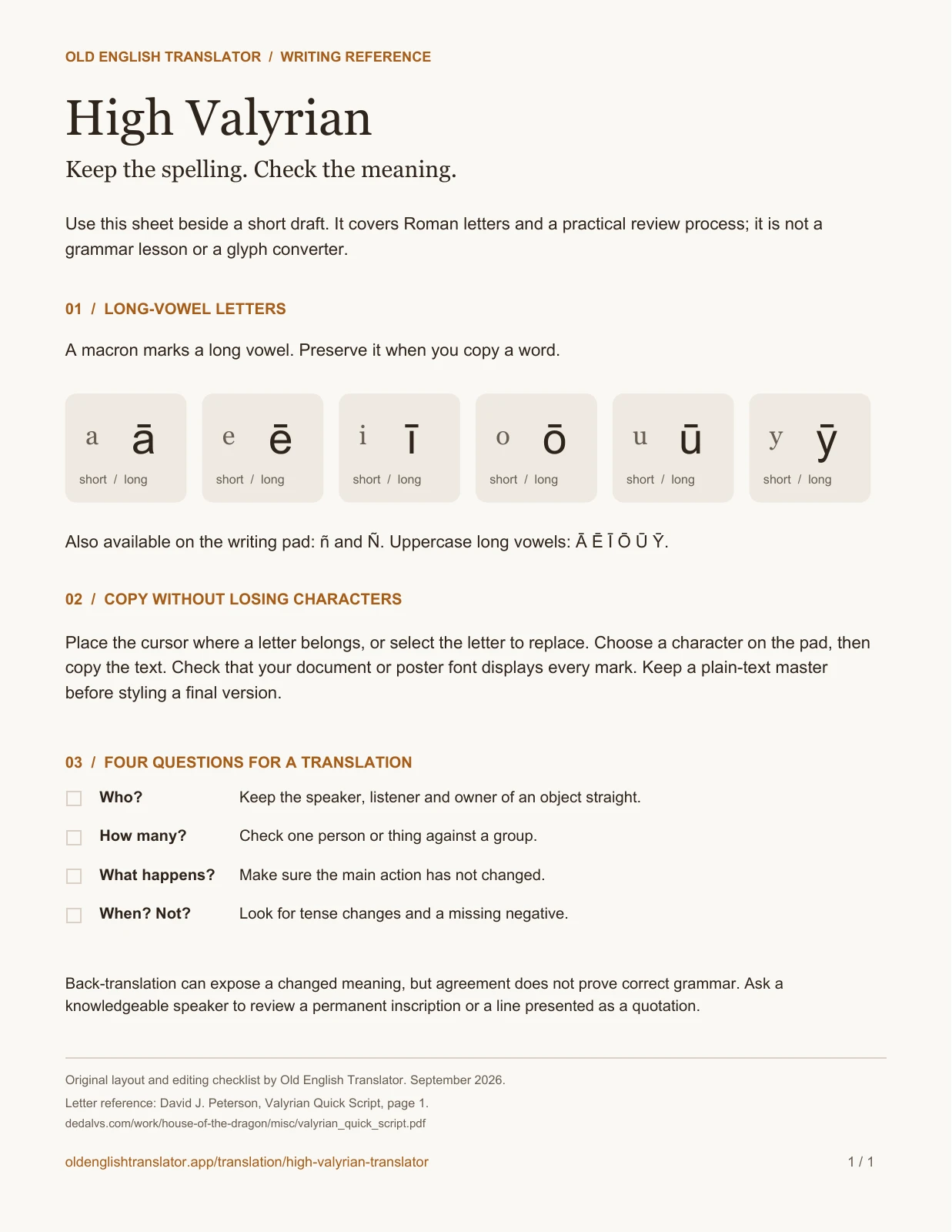
Download the writing reference to use alongside the High Valyrian Translator. It fits the six long-vowel pairs and four meaning checks on one printable page.
Before using a decorative font, save a plain-text copy. Check that the font displays ȳ and the other marked letters. If one turns into a box or loses its mark, choose another font.
0 / 500 characters · 0 long-vowel letters
Copy your text before leaving or reloading this page.
One-page reference
Preview the one-page writing guide
High Valyrian Translator: common questions
Reverse translation, spelling, learning and quotations.
What is High Valyrian?
High Valyrian is a constructed language used in Game of Thrones and House of the Dragon. David J. Peterson developed it for television from George R. R. Martin’s books. Its grammar changes word forms, so an English word does not always map to one fixed Valyrian word.
Can I translate English to High Valyrian and back?
Yes. Set English as the source for English-to-Valyrian translation. To read a Valyrian sentence, use the swap button on the High Valyrian Translator so High Valyrian becomes the source, paste the text and press Translate.
Is High Valyrian the same as Dothraki?
No. Dothraki and High Valyrian are separate languages. A TV line may also be in a different Valyrian variety. If you are copying dialogue from a clip, identify the language first; this tool is set up for High Valyrian.
How do I type ā, ē, ī, ō, ū and ȳ?
Select the unmarked letter in the writing pad and press its marked version: select a and press ā, for example. Use Uppercase for Ā. Add marks only where your source spelling includes them; the pad does not choose the spelling for you.
Can I use this to learn High Valyrian?
Use the High Valyrian Translator for small comparisons, such as “I will return” and “We will return.” Record what changes, then check that change against a lesson or grammar reference. Keep corrections with each example so you do not memorize an unchecked form.
Can I translate a tattoo, house motto or quotation?
For a tattoo or engraving, get the wording checked by a knowledgeable speaker before committing to it. For a quotation, use the original Valyrian dialogue. Translating an English subtitle again can produce a different sentence. The motto examples above show how to make the intended English meaning clear.
Is the High Valyrian Translator free, and does it include audio?
Yes. The text tool is free and needs no account. It accepts Roman-letter text, including marked vowels, and returns text only. It does not generate speech or fictional glyphs. This fan tool is unaffiliated with HBO or the language’s creators.
Keep exploring
Popular Translators
Continue with our most popular language and writing tools.
Use the High Valyrian Translator for your next line
Enter an English sentence, or swap the languages to read a High Valyrian line.